


Table of Contents
- Why Recruiters Skip the Database
- What Search & Match Actually Does
- What Happens When Candidates Respond
- The Numbers From Real Customers
- The Recruiter Doesn't Learn a New Tool
- What About Old Records in the Database?
- When Search & Match Works Best
- Search & Match + AI Recruiter: The Full Funnel
- Stop Paying for Candidates You Already Have
- Frequently Asked Questions
Try Whippy for Your Team
Experience how fast, automated communication drives growth.
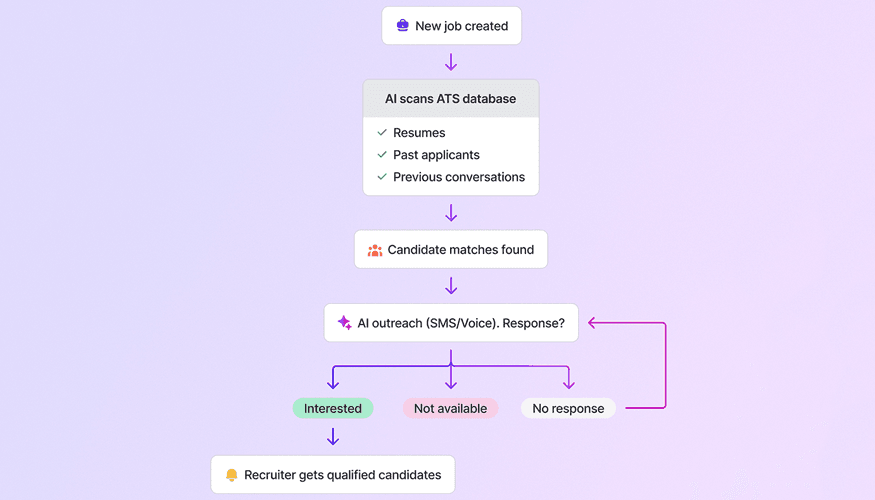
How AI-powered candidate matching is helping staffing agencies fill jobs faster, spend less on job boards, and get real value from the database they've been building for years.
There's a habit baked into almost every staffing agency's workflow: a new job order comes in, and the first move is to open Indeed, ZipRecruiter, or LinkedIn and start posting. It's automatic. It's fast. And it's quietly costing you money you don't need to spend.
Because sitting in your ATS, sometimes tens of thousands of candidates deep, are people you already sourced, already screened, and already have a relationship with. People you paid to find. And most of the time, nobody reaches out to them first. The database just sits there.
That's the problem Whippy Search & Match was built to solve.
Why Recruiters Skip the Database
It's not that recruiters don't know the database exists. They know. The problem is that searching it manually is slow, imprecise, and in most ATS platforms, genuinely painful.
Keyword search is the main culprit. It returns candidates whose resumes happen to contain the right words, not necessarily the candidates whose experience is most relevant. Someone who spent five years doing the exact job under a slightly different title? Invisible. A candidate who lives 12 miles from the job site but whose ATS address is from a previous zip code? Filtered out.
And even when a recruiter does find a strong match the traditional way, they're still at the beginning of the outreach process. Manual calls. Emails sent one at a time. Follow-ups tracked in a spreadsheet or, worse, in memory. The friction compounds at every step until posting externally just feels like the path of least resistance.
The result: job boards get the first look, and the internal database gets ignored. Not because external candidates are better, but because the path to them is easier.
What Search & Match Actually Does
Whippy Search & Match flips the default. The moment a new job order opens, the system doesn't wait for the recruiter to start searching. It's already running.
Here's how it works:
Step 1 • Find: Two Signals, Not One
The system searches your entire indexed candidate database using two inputs simultaneously:
Semantic similarity uses vector embeddings to compare the meaning of the job description against every candidate profile. Not just shared words, but conceptual relevance. A candidate whose title doesn't match but whose experience does will surface. A school teacher matched to a summer permit-review role because similar profiles had been placed before. That's the kind of connection keyword search never makes.
Geographic proximity filters by actual driving distance from the job site, cross-referencing both the address in the ATS profile and the address on the resume. It reflects what's realistic for that specific market, not a generic radius applied universally.
Historical placement data also factors in. Profiles similar to candidates who were successfully placed in the past carry more weight, grounding the search in evidence from real hires, not just heuristics.
Step 2 • Evaluate: A Reasoning Layer on Top of the Search
A high similarity score doesn't automatically mean a good match. After the initial search, an AI reasoning layer evaluates each candidate against the actual requirements of the role. It catches the things embeddings alone miss:
- The candidate is overqualified or underqualified in ways that matter for this specific job
- They changed specialties in a way that affects fit
- The distance is technically within range but logically impractical for the local market
- Profile data is incomplete or inconsistent
Only candidates who pass both stages get surfaced. And each one comes with a plain-language explanation of why they made the list. Not a score. A reason. This is what makes recruiter feedback faster and more actionable.
Step 3 • Outreach: Automated Before the Recruiter Opens the Job Screen
Once matched candidates are identified, Whippy pushes them into the ATS and automatically sends each one a text message within minutes: we have an opening, are you interested?
No recruiter action required. If a phone number is undeliverable, an email fallback fires automatically and a note is logged in the ATS. The system contacts each candidate a maximum of five times, once per day, then stops.
What Happens When Candidates Respond
This is where things get genuinely useful. Every response triggers an automated workflow that updates the ATS without any manual work from the recruiter.
RESPONSE | WHAT HAPPENS AUTOMATICALLY |
|---|---|
Yes / Interest | Status updates to active candidate. Comment logged in ATS. Recruiter receives a notification. |
No | System sends one follow-up: "Still open to future opportunities?" If yes, stays active. If no, deactivation workflow runs. |
No response | Candidate stays in the ATS under match status. Recruiter can call them directly. |
Undeliverable number | Note logged. Email fallback fires. Recruiter decides next step. |
One important thing to know about "no response": it means the candidate didn't reply to a text. Not that they're unavailable, not that they're uninterested. People screen texts. They pick up phones. In practice, many of these candidates convert when a recruiter calls. The match itself is still valid.
The Numbers From Real Customers
Results from agencies using Search & Match in production tell a consistent story.
One agency sent 318 automated texts to matched candidates over several weeks. 71 people responded. Of those 71, 69 said yes.
Another agency in Florida saw a 25% interest rate on matched candidates. 1 in 4 people automatically contacted said they wanted the job, with zero recruiter involvement to generate those responses.
A third agency cut their job board spend in half after implementation and, according to the team, also saved the equivalent of a full person's time in manual sourcing work.
An internal survey at one customer in Q2 found that 100% of recruiters said they moved candidates into dialogue using Whippy Match, and roughly 80% said they were able to do it faster than before.
The Recruiter Doesn't Learn a New Tool
Search & Match lives inside the ATS your team already uses: Tempworks, Bullhorn, Aviante, Zenople, Loxo, Crelate, and others. No new dashboard. No separate login. No parallel workflow to maintain.
When a job order opens, matched candidates appear in the same job order screen recruiters use every day. From there, they can see:

A ranked list of matched candidates with contact info, status, and distance
A plain-language reason for each match (not a raw score)
A map view showing where candidates are relative to the job site
Real-time status updates as candidates respond
Recruiters can request more candidates beyond the default cap, push selected candidates forward as formal submissions, and give thumbs up / thumbs down feedback on each match, which feeds directly into performance reporting.
The goal isn't to replace recruiter judgment. It's to eliminate the part of the job that doesn't require it.
What About Old Records in the Database?
This question comes up constantly: "Our database is full of candidates from five years ago. Won't the matches be useless?"
The short answer: an old record means the last data point in the system is old. It doesn't mean the person hasn't worked since then. It doesn't mean they're unavailable today.
The automated outreach is exactly how you find out. If they respond, the data is live again. If they don't, the recruiter can deactivate the record and clean up the database at the same time. A candidate who hasn't been contacted since 2018 and responds "yes" to a text today isn't a bad match. They're a placement waiting to happen.
When Search & Match Works Best
Search & Match is built for staffing companies and recruiting agencies that check most of these boxes:
Best fit:
Large ATS database, especially one accumulating records for years
Spending on job boards and looking to reduce that dependency
Steady flow of job orders where automation compounds quickly
High-volume roles: industrial, warehouse, logistics, light manufacturing, hourly workers
Also works well for:
Healthcare staffing
Professional and office roles (accounting, IT, administrative)
Executive search agencies with large proprietary databases
The companies that see the fastest results tend to be those with the largest dormant databases. What looks like a liability, thousands of old uncontacted records, turns out to be the asset. The system reaches out to all of them. The ones who respond are live leads again.
Search & Match + AI Recruiter: The Full Funnel
Search & Match pairs naturally with Whippy AI Recruiter for teams that want to automate beyond sourcing. To see how AI agents are being used across the staffing workflow, the full picture goes well beyond matching.
When both run together, the flow is:
- Match identifies candidates and pushes them to the job order in the ATS
- Automated outreach goes out; interested candidates enter the AI Recruiter flow
- AI Recruiter screens them via call or text
- Interview score appears alongside the match indicator in the ATS
- Recruiter arrives to pre-qualified candidates with two signals: match quality and screening score
The end state: when the recruiter sits down, they have a calendar of interviews with candidates who were already identified, contacted, pre-screened, and scored. Without any manual sourcing work.
Stop Paying for Candidates You Already Have
If your team's first instinct when a job order opens is to post on Indeed before checking the database, that's exactly the gap Search & Match closes.
The candidates are probably already there. The question is whether your tools can find them, evaluate them, and reach out fast enough to matter.
Whippy Search & Match does all three automatically, the moment a job order opens, inside the ATS your team already uses.
See it in action with a live demo ↗
Frequently Asked Questions
Q: Does Search & Match work if our ATS data isn't clean?
A: Yes. The system uses multiple signals to compensate for incomplete data: semantic embeddings, work history, and geographic proximity. If a resume is missing, it uses the candidate's work history. If there's no skills section, it uses the full profile. Data hygiene improves results over time but is not a prerequisite for getting started.
Q: Do matched candidates have to have applied to a specific job?
A: No. Any candidate in your ATS can be matched, regardless of application history.
Q: How does Search & Match handle candidates who've been inactive for years?
A: It matches them based on profile relevance, then sends automated outreach to find out if they're available today. Inactive doesn't mean unavailable. The outreach is how you find out.
Q: What happens if no matches are found?
A: If the system finds no candidates that pass both the semantic search and reasoning evaluation stages, the job posts externally automatically. No job is left without coverage.
Q: Which ATS platforms are supported?
A: Tempworks (the original integration), Bullhorn, Aviante, Zenople, Loxo, Crelate, and Accor/Erecruit. The list continues to grow.
Q: How quickly does outreach go out after a job order opens?
A: Matched candidates receive a text message within minutes of the match running. No recruiter action is required.
Table of Contents
Table of Contents
- Why Recruiters Skip the Database
- What Search & Match Actually Does
- What Happens When Candidates Respond
- The Numbers From Real Customers
- The Recruiter Doesn't Learn a New Tool
- What About Old Records in the Database?
- When Search & Match Works Best
- Search & Match + AI Recruiter: The Full Funnel
- Stop Paying for Candidates You Already Have
- Frequently Asked Questions
Try Whippy for Your Team
Experience how fast, automated communication drives growth.

Related Articles

Best AI Recruiting Tools for Franchise Staffing
 Elizabeth Long
The Staffing Operating System for Avionté
Elizabeth Long
Automated License Verification for Staffing Agencies
Elizabeth Long
Write Job Descriptions That Make AI Recruiters Perform
Elizabeth Long
Payroll Communication for Staffing Agencies
Elizabeth Long
Automated Employee Call-Off System for Staffing Firms
Elizabeth Long