Added: Bulk Value Actions for Advanced Multiselect Filters

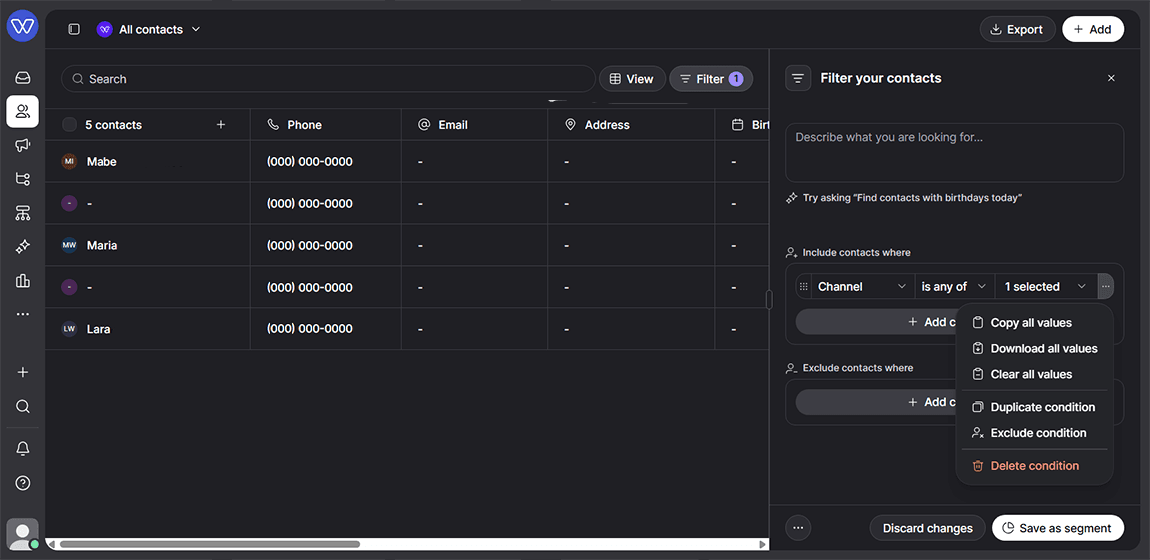
Whippy added bulk value management for advanced multiselect filters, making it faster to paste, copy, clear, and download filter values in bulk.
What's Included
- Bulk paste: Users can paste multiple values directly from a spreadsheet into supported filter fields
- Copy all: Users can copy all selected filter values in one action
- Clear all: Users can clear all selected filter values at once
- CSV download: Users can download selected filter values as a CSV file
How It Works
These bulk actions appear in the existing condition menu for multivalue filter operators, such as is any of and is none of. Users open the filter condition, select the bulk action they need, and apply it directly, without adding or removing values one at a time.
Why It Matters
Filters with long value lists are slow to build and easy to get wrong when managed manually. Bulk paste, copy, clear, and download actions reduce repetitive work and cut down on setup time for large filter and audience conditions. This is especially useful for teams managing segmentation, list building, or campaign targeting across large contact sets in Whippy.
Setup
No setup is required. Bulk value actions are available now in the condition menu for any advanced multiselect filter that supports is any of or is none of operators.
Notes
Bulk actions apply only to multivalue filter operators. Single-value filter conditions are not affected by this update.