Added: Mobile Reporting, VoIP Calling & Inbox Controls

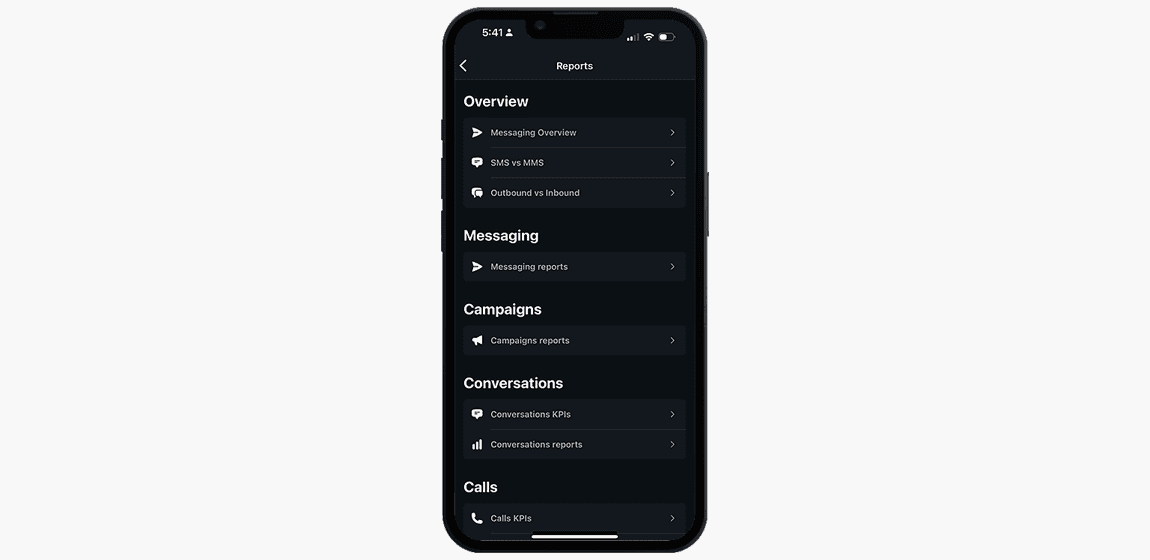
The Whippy mobile app now includes new reporting dashboards, internal VoIP calling, call queue monitoring, a smarter inbox filter, Do Not Disturb controls, and a live call connection quality panel.
What’s Included
Reporting dashboards, now on mobile:
- Conversations Reports: new, opened, closed, inbound, and replied counts; response times; team performance; activity charts; heatmap; and filters by date, user, channel, and time interval
- Calls Reports: total and missed call counts, busy-time heatmaps, trend charts, and performance by user and channel
- Agents Reports: AI agent completion rates, average call duration, estimated time saved, sentiment breakdown (positive, neutral, negative), and performance by agent and channel
Inbox and notifications:
- All Chats filter: new option on the Inbox home screen that shows only conversations where the last activity was a message, not a call
- Do Not Disturb: pause all notifications (calls, messages, push) for a preset or custom duration; resumes automatically or manually
Call management:
- Call Queue Visibility: live count of callers waiting, longest current wait time, and near-real-time queue activity
VoIP calling:
- Internal VoIP calls between teammates, initiated from the Inbox, Keypad, or Users list
- Channel calling: call a shared Channel so any available member can answer, from Keypad search or Inbox
- Call Connection Quality Panel: live latency, jitter, and packet loss readings during active calls
How It Works
Reports are available from the tab More in the main navigation of the mobile app. Each report type renders filterable charts and data tables. Select a date range, channel, or team member and the view updates in real time.
The All Chats filter is on the Inbox home screen. It excludes any conversation whose last recorded activity was a phone call, leaving only active message threads.
Call queue data is available from the Header when at least one call is parked and refreshes automatically. No setup required.
Do Not Disturb is accessible from Settings → Pause Notifications inside the app. Choose a preset duration or set a custom one. All notification types (calls, messages, and push) are muted until the timer expires or manually resumed.
Internal VoIP calls are placed by selecting a teammate or channel and tapping the call icon. Calls route through Whippy’s VoIP infrastructure without requiring an external phone number. The Connection Quality Panel appears during any active call and shows live network diagnostics.
Why It Matters
Until this release, reporting required the desktop interface. Managers and team leads can now review conversation metrics, call performance, and AI agent data from their phone, without switching devices.
The All Chats filter reduces inbox noise for teams handling both calls and messages, making it faster to find threads that need a written response.
Call queue visibility on mobile lets managers catch growing wait times and reassign agents before customers are affected, no desktop needed.
Internal VoIP calling keeps team communication inside Whippy and removes the need to switch to an external dialer. Channel calling ensures shared lines are covered without designating a specific agent in advance.
The Connection Quality Panel gives agents real-time feedback when audio degrades, so they can identify network issues during a call rather than after.
Notes
Version 2.1.1 is available on iOS and Android. Update through your device’s app store.
Reporting access and call queue visibility depend on your Whippy plan and user permissions. Contact your account administrator to confirm availability.