Added: Call Connection Quality Panel for VoIP Calls

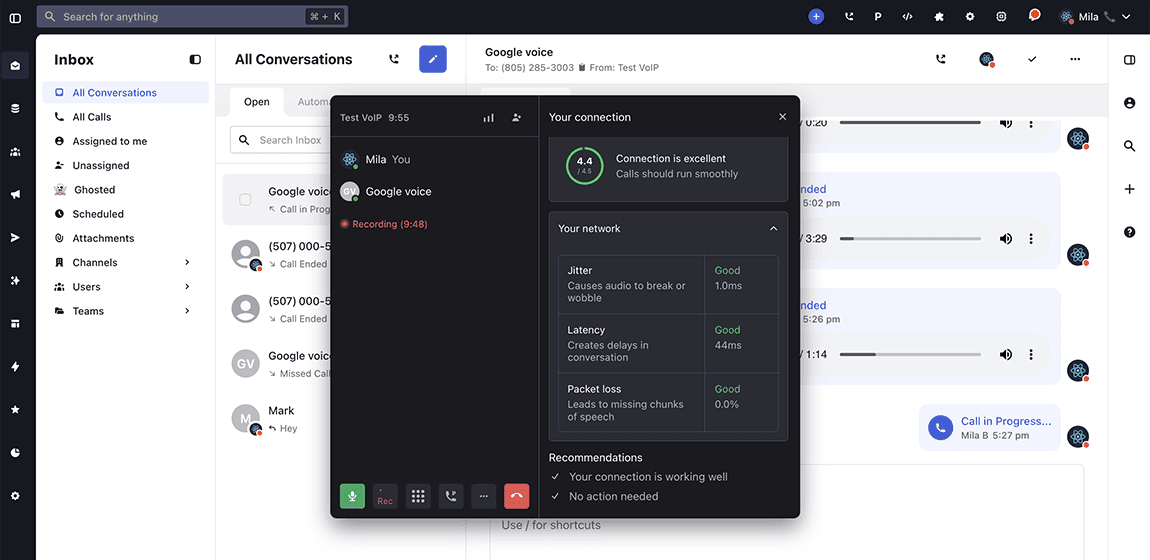
We added a real-time Connection Quality panel inside the Active Call dialog. Users can now monitor VoIP call performance without leaving the live conversation.
How It Works
During any active VoIP call, users can open the new “Your Connection” panel directly within the call interface.
The panel displays:
- An overall connection rating such as Good or Weak
- Live network performance metrics including latency, jitter, and packet loss
- Dynamic updates as network conditions change
- Actionable recommendations when connection quality drops
The data refreshes in real time while the call is active. If network performance declines, the system surfaces guidance to help stabilize audio quality before the issue escalates.
This feature works across Whippy’s cloud-based business phone system and supports teams using VoIP for sales calls, support conversations, and client communication. Learn more about our VoIP capabilities on our Business Phone System page.
Why It Matters
- Clear visibility during live calls:
Users can immediately see whether call issues are related to network conditions. This removes uncertainty during important sales or support conversations. - Reduced troubleshooting time:
Instead of guessing why audio sounds delayed or distorted, teams can check measurable network indicators such as latency and packet loss. - Proactive issue resolution:
Real-time recommendations help prevent call deterioration. Users can address WiFi instability or bandwidth constraints before the call drops. - Improved call transparency:
Clear network diagnostics increase trust in VoIP call performance and provide objective data when discussing audio quality concerns.
This update improves voice communication reliability and gives teams greater control over call quality during critical conversations.