Added: Schedule AI Agent Calls and Chat Sessions

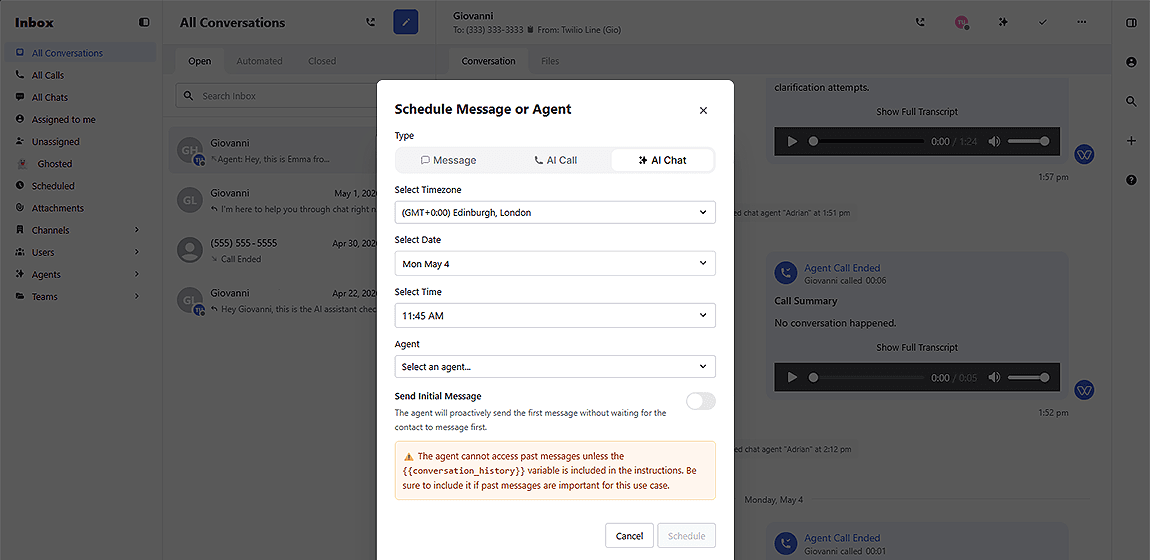
Whippy added outbound call scheduling and timed chat session support to AI Agent automations, tools, the Inbox, and the public API, giving teams full control over when AI-driven outreach happens.
What's Included
- Start Call action: Outbound AI calls are now available as an automation action, with immediate or scheduled delivery.
- Scheduled Start Chat action: The existing Start Chat action now supports a future start time, so AI Agent chat sessions no longer have to begin immediately.
- Dynamic scheduling via Execute Actions tool: AI Agents can schedule follow-up calls or chat sessions mid-conversation, in real time.
- Inbox scheduling for calls and chats: Users can manually schedule calls and chat sessions from the Inbox, consistent with how message scheduling already works.
- API support via schedule_at: The public V1 start_call and start_chat endpoints now accept a schedule_at parameter for external scheduling from any connected system.
How It Works
From Automations
Add a Start Call or Start Chat action anywhere actions are supported. Choose whether it triggers immediately or at a scheduled time. No separate timing logic required.
From the Inbox
Select a contact, choose Start Call or Start Chat, and pick a delivery time, the same flow used to schedule messages today.
Via AI Agent (Execute Actions tool)
During a live call or chat, the AI Agent can schedule the next touchpoint on its own. For example: if a candidate asks to continue the conversation tomorrow, the agent books that session before the current one ends.
Via API
Pass schedule_at as an ISO 8601 timestamp in the start_call or start_chat request body. No external scheduling service needed.
Why It Matters
Before this update, outbound AI calls weren't available as an automation action, and every AI Agent session had to start immediately. That forced teams to build timing logic outside Whippy or manually trigger outreach at the right moment.
Now, recruiting, sales, and support teams can schedule AI-driven calls and chats the same way they already schedule messages, reducing manual intervention, eliminating external orchestration overhead, and letting AI Agents handle follow-up timing autonomously during live conversations.
Setup
No additional configuration is required for Inbox scheduling or automation actions. To use prompt-based scheduling inside the Execute Actions tool, make sure the AI Agent's prompt includes the current time variable, for example, {{current_time_America/New_York}}, so the agent knows the current time when scheduling. Refer to your AI Agent prompt settings for details.
Notes
- Prompt-based scheduling for Start Call and Start Chat is only available inside the execute_actions tool.
- Scheduled calls may start slightly after the selected time during high-traffic periods. Treat the scheduled time as a target, not a guaranteed exact timestamp.
- Context sharing between AI Agent calls and chat sessions is being improved in a future release.