Added: Next Scheduled Step Indicator in Message Editor

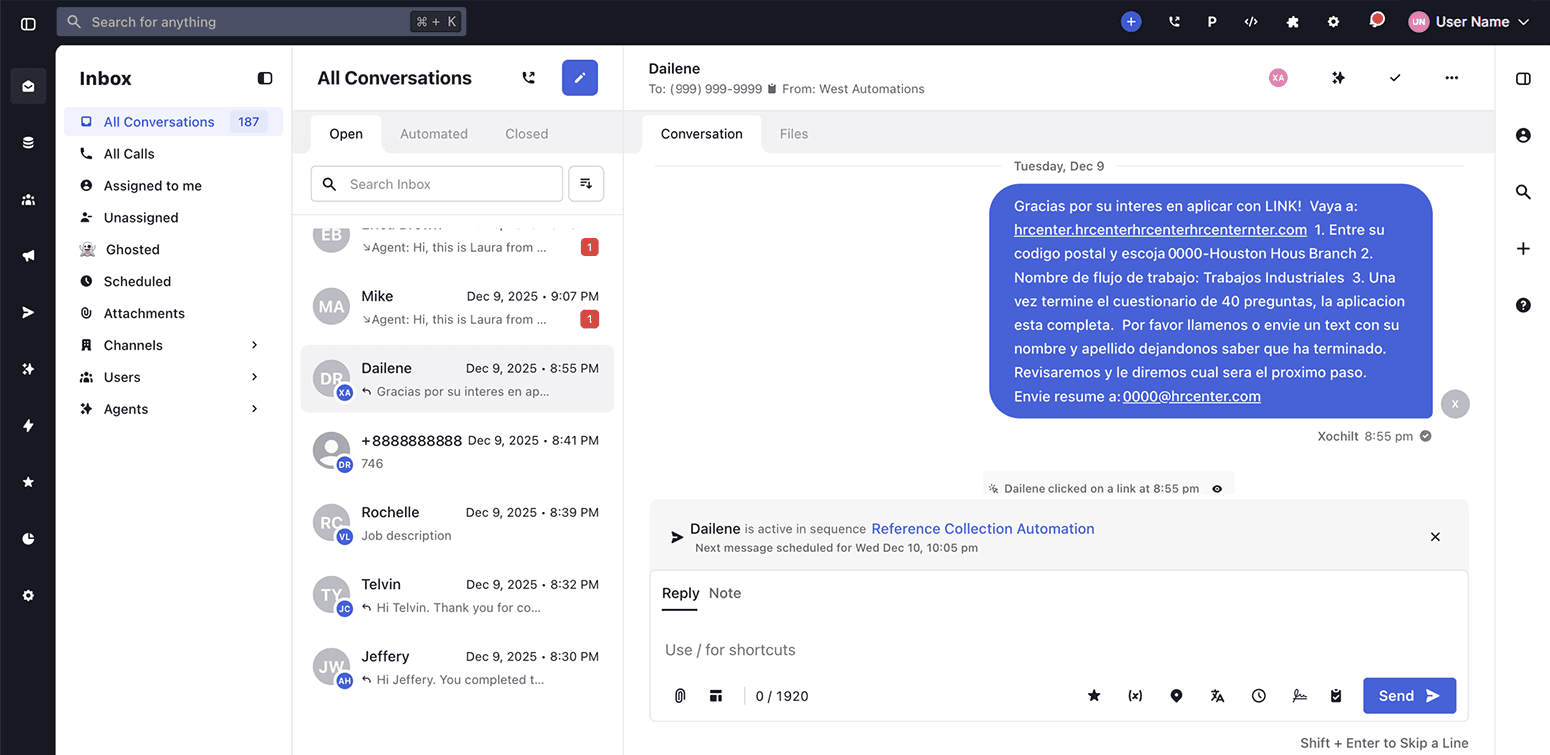
A clearer view of what’s happening next in your sequences.
We added a new display inside the Message Editor that shows the exact next scheduled step for any contact currently active in a sequence. This update gives users immediate insight into what action is coming next, whether it’s an SMS, an email, or a Voice AI call.
How It Works
The “Contact is active in Sequence” indicator now displays the correct upcoming step based on the sequence’s channel type. Instead of only showing that a contact is in a sequence, it now shows the next scheduled action and its time.
Examples include:
- “Next call scheduled for {time}” when the next step is an outbound call from a Voice AI agent
- “Next email scheduled for {time}” when the next step is an email
- “Next message scheduled for {time}” when the next step is an SMS or other supported messaging channel
This information appears directly inside the Message Editor, helping you understand sequence timing without switching screens.
Why It Matters
Previously, users had no visibility into what the system would do next for a contact active in a sequence. This made it difficult to anticipate upcoming communication or gauge where a contact was in the automation flow.
By displaying the next scheduled step:
- Users gain immediate clarity into the contact's progress
- Workflows become easier to manage and predict
- Teams reduce accidental overlaps or unnecessary follow-ups
- Planning and timing across SMS, email, and Voice AI channels improve
This update supports smoother automation and more confident communication, especially for teams using advanced sequences across multiple channels.