Added: Call Extensions Work Without a Desk Phone

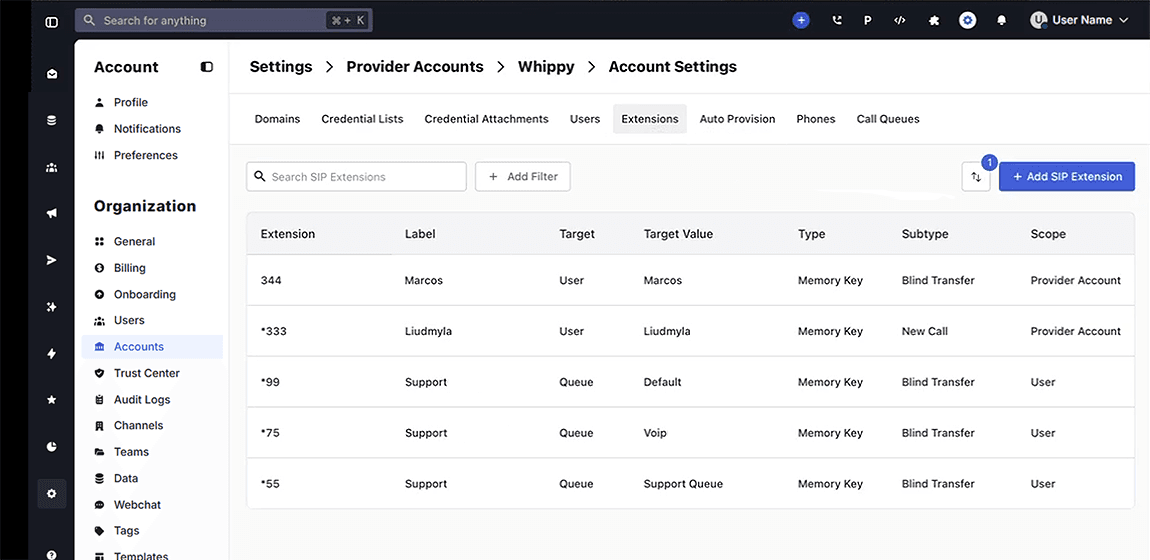
Admins can now assign a call extension to any active Whippy user, no desk phone or SIP registration required.
What's Included
- A new User Type field in Extension settings, unlocked when User is selected as the routing target.
- Two assignable routing paths per extension: SIP User (desk phone required) or User (Whippy account–based, hardware-optional).
- Name search that surfaces any active Whippy user, not just those registered with a SIP device.
- Compatibility with both direct dial and call transfer extension types.
How It Works
Whippy's cloud phone system previously required every extension target to be a registered SIP User, a hardware-dependent designation meaning the person had a physical desk phone provisioned and linked to the system. Anyone without that setup was invisible to the extension directory, regardless of whether they had an active Whippy account.
This update added a second routing path: Direct User. When an extension is configured with this path, the system resolves the call to the user's Whippy account rather than polling for a SIP registration. If that user has desk phones registered, those still ring. If they don't, the call reaches them through their account-connected devices.
Both paths, SIP User and Direct User, are available on every extension. Admins choose per extension based on how each team member is configured.
Why It Matters
In teams where not every employee operates from a fixed desk, remote staff, distributed customer support agents, field reps, or new hires mid-onboarding, the SIP-only requirement created a real operational gap. Those users couldn't receive transferred calls or be assigned a quick-dial extension until their hardware setup was complete, which in some environments takes days or weeks.
For customer-facing teams running high call volumes through a VoIP business phone system, a missed internal transfer has a direct cost: slower resolution times, dropped handoffs, and calls that hit dead ends instead of reaching the right person.
Direct User routing closes that gap. Any user active in Whippy is immediately assignable to an extension, no SIP trunk provisioning, no desk phone hardware, no waiting on IT. Internal call routing now reflects the actual structure of the team, not the limits of the hardware inventory.
Setup
- Go to Settings → Accounts → Update Account → Extensions.
- Select an existing extension or create a new one.
- Set the Target field to User.
- A User Type field will appear. Select one of the following:
- SIP User: for team members with a provisioned desk phone.
- User: for all other active Whippy users, including remote and softphone-only staff.
- Use the name search to locate and assign the team member.
- Save. Routing takes effect immediately, no restart or sync required.
Notes
- Extensions set to User routing will still ring any desk phones registered to that user's account.
- Existing SIP User–based extensions are not affected. No reconfiguration is needed.
- A user must have an active account in Whippy to appear in the extension search. Deactivated or pending users do not appear.
- This update applies to both transfer extensions and direct dial extensions.
- For high-volume inbound call routing, review your Whippy Voice configuration to confirm extensions align with your current team structure.